Why CRM onboarding risk is often underestimated
CRM onboarding rarely fails because a team lacks effort. It usually fails because the business treats implementation as a software setup task when it is actually an operational design exercise.
That distinction matters.
A CRM touches pipeline management, handovers, reporting, lifecycle stages, automation, permissions, lead routing, marketing attribution, service processes and forecasting. If those things are not designed properly at the start, the system may still go live, but it does not become a reliable CRM as source of truth. In other words, the platform exists, but the operating model is still broken.
This is where self-managed CRM onboarding starts to get risky.
Once multiple teams, legacy data, handoff rules, revenue reporting requirements and adoption pressures enter the picture, CRM implementation becomes less about switching a platform on and more about building a structured operational system that your team can trust.
This article looks at where self-managed CRM onboarding tends to break down in three areas:
- implementation design
- data migration
- user adoption
If you are leading customer relationship management strategy, evaluating a new CRM rollout, or planning a move into HubSpot, these are the points worth pressure-testing before the risk shows up in your pipeline, reporting and team behaviour.
The problem is not effort. It is hidden complexity.
Most internal teams do not go into CRM onboarding carelessly. They usually start with sensible intentions:
- keep costs down
- move quickly
- let internal experts own the system
- avoid dependency on an external partner
All of those are reasonable.
The issue is that CRM onboarding challenges rarely appear in the first week. They show up later, when a business realises that the property structure does not support reporting, the automation logic clashes across teams, imported records cannot be trusted, and sales reps have already built workarounds outside the platform.
By that point, the business is not fixing a setup task. It is undoing production decisions.
Where self-managed CRM onboarding usually breaks down
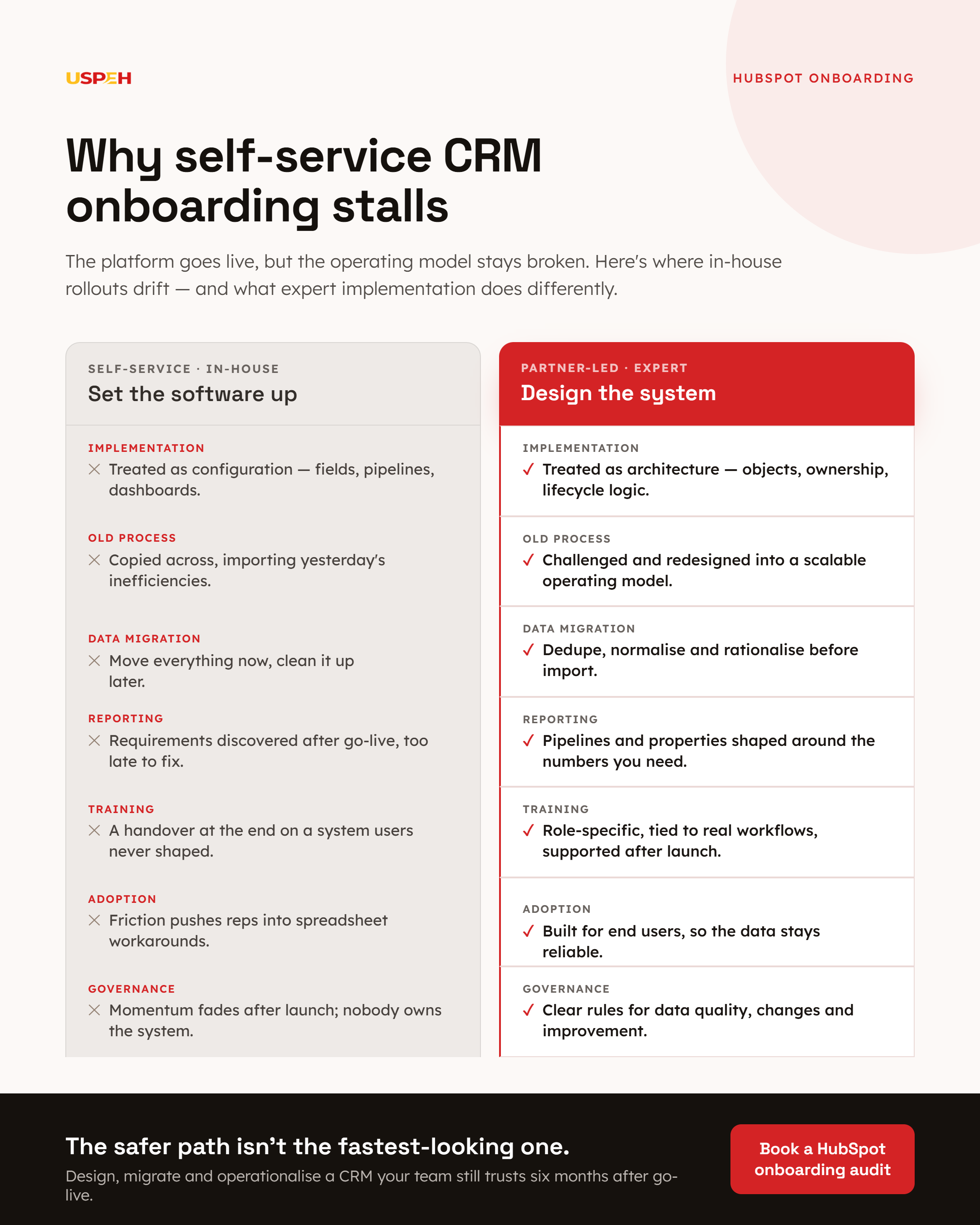
1. Implementation is treated as configuration, not architecture
A common mistake in CRM implementation is assuming the platform only needs fields, pipelines, workflows and dashboards configured.
Technically, that is true at a surface level. Operationally, it misses the harder part.
A proper onboarding requires decisions about:
- which objects should hold which data
- how contacts, companies, deals and tickets should relate to one another
- which lifecycle stages reflect the actual buying journey
- how lead sources should be standardised
- which properties support reporting and which only support process
- how automations should behave when data is incomplete, duplicated or updated out of sequence
- who should own which records and at what stage
- how permissions should protect data quality without slowing the team down
Those decisions are not cosmetic. They determine whether the CRM can support day-to-day execution without creating rework.
In-house teams often know their business process well, but that does not automatically translate into proper HubSpot architecture. The platform gives you flexibility, which is useful, but that flexibility can also produce messy builds if the structure is not thought through up front.
That is where risk begins.
A sales process can be mirrored too literally instead of being made scalable. Properties can be added too quickly, without governance. Teams can create overlapping automation that technically works but creates unreliable outcomes. Reporting fields can be introduced too late, after records are already inconsistent.
The result is a CRM that feels customised but is not actually structured.
2. Businesses copy the old process instead of redesigning it
When onboarding is handled internally, there is often pressure to recreate the current setup exactly as it exists elsewhere.
That feels safe, especially when the previous CRM has years of history behind it. But it often imports old inefficiencies directly into the new system.
If your previous process relied on:
- inconsistent field usage
- duplicated lifecycle definitions
- manual handovers
- spreadsheet-based reporting fixes
- unclear ownership rules
- disconnected sales and service workflows
then copying it into a new CRM simply gives those problems a new home.
A proper onboarding should challenge the current state, not preserve it blindly.
That does not mean replacing everything for the sake of it. It means deciding what should stay, what should be simplified and what should be rebuilt so the CRM supports a cleaner, more scalable operating model.
Without that redesign step, businesses often end up with a platform that is more expensive than the old one, but no clearer in practice.
3. Reporting requirements are discovered too late
This is one of the most expensive onboarding challenges because the damage often remains hidden until senior stakeholders start asking for numbers.
Teams frequently build the CRM around process first and reporting second. Then they discover that:
- pipeline stages are too broad to support meaningful conversion analysis
- source data is inconsistent across channels
- required properties were never made mandatory
- lifecycle movement is not timestamped reliably
- attribution fields do not support proper campaign or revenue analysis
- data ownership is unclear, so dashboards are disputed rather than used
At that point, the system may still look complete. The problem is that the reporting logic underneath it is weak.
For leadership teams, that means forecast conversations become less trustworthy. For RevOps and commercial leaders, it means extra manual checking. For frontline teams, it means confidence in the CRM starts to drop.
Data migration is where small assumptions create big problems
If implementation design is one major risk area, data migration is the other.
Many businesses underestimate how much judgement sits inside a migration.
On the surface, moving data sounds straightforward: export records, clean them, map fields, import them, validate them. In reality, migrations involve structural decisions that affect usability long after the import finishes.
4. Legacy data is assumed to be usable because it already exists
A record being present in the old CRM does not make it clean data.
Legacy systems often contain:
- duplicate contacts and companies
- outdated owners
- inconsistent country, sector or source values
- free-text fields standing in for structured data
- incomplete deal histories
- missing association logic between records
- dead properties that nobody uses but nobody wants to remove
In-house teams know this in theory. The problem is time.
When internal teams are also running sales, marketing, service or operations, data cleaning is usually compressed into a narrower window than it needs. That leads to selective clean-up rather than proper normalisation.
The result is predictable: the new CRM launches with old ambiguity still embedded inside it.
In other words, the migration completed, but the data foundation did not improve enough to support reliable automation or reporting.
5. Field mapping is treated as a one-to-one exercise
This is where many self-managed CRM onboarding projects drift into avoidable complexity.
A migration is not only about matching one field to another. It is about deciding whether the destination structure should remain the same at all.
For example:
- should one legacy account type field become multiple structured properties in HubSpot?
- should historical lead statuses be preserved, consolidated or retired?
- should closed-lost reasons be standardised before import?
- should old custom fields be kept for reporting continuity or dropped to reduce clutter?
- should contact-level values move to company-level properties for better governance?
Those are architecture questions, not spreadsheet questions.
When they are handled too quickly, businesses often end up with one of two bad outcomes:
- too much legacy structure is retained, making the new system harder to use
- too much context is removed, making historical reporting unreliable
A proper migration balances continuity with simplification.
That balance is difficult to achieve without hands-on experience of how HubSpot objects, properties, associations and automations behave in production.
6. Validation is too shallow
A lot of teams validate migration success by checking whether records have appeared in the new CRM.
That is not enough.
Proper validation should test:
- record counts by object and segment
- property population rates
- owner assignment logic
- association accuracy between companies, contacts, deals and tickets
- date field integrity
- deduplication outcomes
- workflow triggers after import
- downstream reporting behaviour
- whether the imported data supports the actual sales and service journey
That is where self-managed CRM onboarding often runs short. Internal teams may validate the import mechanically, but not operationally.
The real question is not whether the records moved. It is whether the business can now run on them with confidence.
7. Historical data gets moved without a governance plan
Not every data point deserves a place in the new CRM.
Businesses that manage onboarding internally often default to moving as much as possible because deleting or archiving data feels risky. But moving too much history into a new structure can make the system harder to manage from day one.
This can show up as:
- bloated property sets
- cluttered record views
- confusing source histories
- old pipeline logic interfering with new reporting
- unnecessary automation exceptions built around obsolete scenarios
A proper migration needs rules about what belongs in the live CRM, what should remain available elsewhere, and what can be retired.
Without those rules, the new system inherits complexity that no longer serves the business.
User adoption fails when the system asks too much of the team
A CRM rollout does not succeed when the build is technically complete. It succeeds when the team actually uses it consistently enough for the data and workflows to stay reliable.
That is where many self-managed onboarding efforts struggle most.
8. Training is left until the end
Internal teams often focus heavily on build tasks first and plan training near go-live.
That sequence is understandable, but risky.
By the time training begins, key system decisions are already fixed. If sales, marketing, service or operations users were not involved early enough, the training session becomes a handover on a system they did not help shape.
That tends to create two problems:
- users do not fully understand why the process works the way it does
- users surface practical blockers too late, when changes are more expensive
Proper onboarding treats training as part of system design, not a final presentation.
User adoption improves when teams can see how fields, automation and record structures map to the work they already do, and where the new process removes risk or saves time.
9. The CRM is built for admins, not for end users
This is a subtle but common CRM onboarding challenge.
When a system is configured in-house, it is often built by the people closest to the implementation project rather than the people using it every day. That can lead to record layouts, required fields and workflow steps that make sense administratively but slow down real work.
For example:
- too many mandatory fields at the wrong stage
- record views that bury key information
- lifecycle or pipeline definitions that are technically accurate but hard to apply quickly
- automation that creates noise rather than guidance
- activity expectations that add friction without improving insight
If reps or service users feel the system is slowing them down, they will create workarounds.
Once that starts, user adoption becomes difficult to recover. The CRM may still contain data, but it no longer reflects actual operational behaviour.
That is one of the clearest signs that self-managed CRM onboarding has drifted into risk.
10. Internal accountability fades after launch
In-house onboarding often has strong momentum during the project phase because one or two stakeholders are driving it.
After launch, that energy can fade.
The business then discovers that nobody has clear ongoing ownership for:
- data quality governance
- workflow monitoring
- field change control
- user feedback loops
- reporting integrity
- onboarding of new starters
- process refinement after the first quarter of use
Without that layer, even a decent initial build can deteriorate.
This matters because CRM onboarding is not only a launch event. It is the start of a governed system that needs maintenance, refinement and adoption management.
If nobody owns that properly, the platform slowly becomes less structured, less trusted and less useful.
Why this matters more in HubSpot than many teams expect
HubSpot is often perceived as intuitive, which is one of its strengths. But ease of use at the interface level should not be confused with simplicity at the architecture level.
HubSpot gives businesses a lot of flexibility across objects, custom properties, associations, lists, workflows, lifecycle stages, permissions, reporting and automation. That flexibility is what makes it powerful for growing teams.
It is also why onboarding risk can build quietly.
A system can look clean on the surface while still carrying structural weaknesses underneath:
- inconsistent property design
- weak data governance
- unclear record ownership
- overlapping automation logic
- disconnected marketing and sales definitions
- reporting built on incomplete required fields
That is where hands-on implementation experience matters.
We have hands-on experience with HubSpot onboarding, optimisation, migration and training work that goes beyond getting the portal live. The real objective is not just to configure your CRM, automate your sequences, and train your team. It is to leave your business with a clean, structured CRM, a clear pipeline, and a setup your team can actually rely on.
When self-managed CRM onboarding can still work
Not every business needs external onboarding support.
A self-managed CRM rollout can be a sensible choice if:
- your process is relatively simple
- you are onboarding one team rather than several
- your existing data is already well-governed
- your reporting requirements are modest
- you have strong internal HubSpot capability
- you can dedicate real time to design, testing, migration validation and training
If that is your situation, a self-managed approach may be enough.
But if your onboarding involves migration from another CRM, multiple teams, layered automations, attribution expectations, service handoffs, or leadership reporting requirements, the margin for error narrows quickly.
That is where a do-it-for-you partner often becomes the safer path, not because the platform is unmanageable, but because the risk sits in design quality, migration reliability and adoption discipline.
What a safer CRM onboarding approach looks like
A lower-risk onboarding does not begin with templates. It begins with structure.
Here is what that usually includes:
Discovery before configuration
Before fields or workflows are built, your business needs clarity on process, ownership, reporting goals and handoffs. That avoids building a system around assumptions that later need unwinding.
Data cleaning before import
Migration should start with clean data rules, not just file preparation. That includes deduplication, normalisation, property rationalisation and decisions about what should not move forward.
Build decisions tied to reporting
Properties, pipelines and lifecycle logic should be shaped around the reporting and operational decisions the business needs to make later.
Testing that reflects live usage
Testing should cover workflow behaviour, associations, permissions, notifications, reporting outputs and edge cases, not just record imports.
Training tied to real workflows
Training works best when it is role-specific, grounded in the team’s day-to-day work, and supported after launch rather than treated as a one-off session.
Governance after go-live
A proper onboarding leaves behind rules for property creation, process changes, adoption monitoring and continuous improvement.
That is how CRM onboarding becomes scalable rather than fragile.
The safer path is not the fastest-looking path
The biggest risk in self-managed CRM onboarding is not usually a dramatic launch failure.
It is the quieter outcome where the system goes live, looks acceptable, and then gradually creates friction:
- reporting disputes
- low user adoption
- unreliable automation
- weak data confidence
- manual workarounds
- missed handoffs
- slower decision-making
Those issues do not always appear immediately. But once they do, they are expensive to correct because they sit inside the operational foundation of the CRM.
That is why the safer path is rarely the path that looks quickest at the start.
A proper onboarding takes more discipline up front because it treats CRM implementation as a business-critical systems project, not a software setup task.
If your business is preparing for HubSpot onboarding, re-onboarding, or a migration from another CRM, the decision is not simply whether you can manage it internally. The real question is whether you can design, migrate and operationalise the system well enough for your team to trust it six months after go-live.
Book a HubSpot onboarding audit to identify implementation, migration and adoption risks before go-live.
.png)